Deleted the wrong files? Get them back.
NicoVault File Recovery scans the drive they were on – your PC, a USB stick, an SD card or an external disk – and shows the deleted files with their names, folders and a preview. The scan and the preview are free. Pay only when you see what comes back.
✓ Signed installer✓ No ads or toolbars✓ Uninstall anytimeWhat setup installs ↓
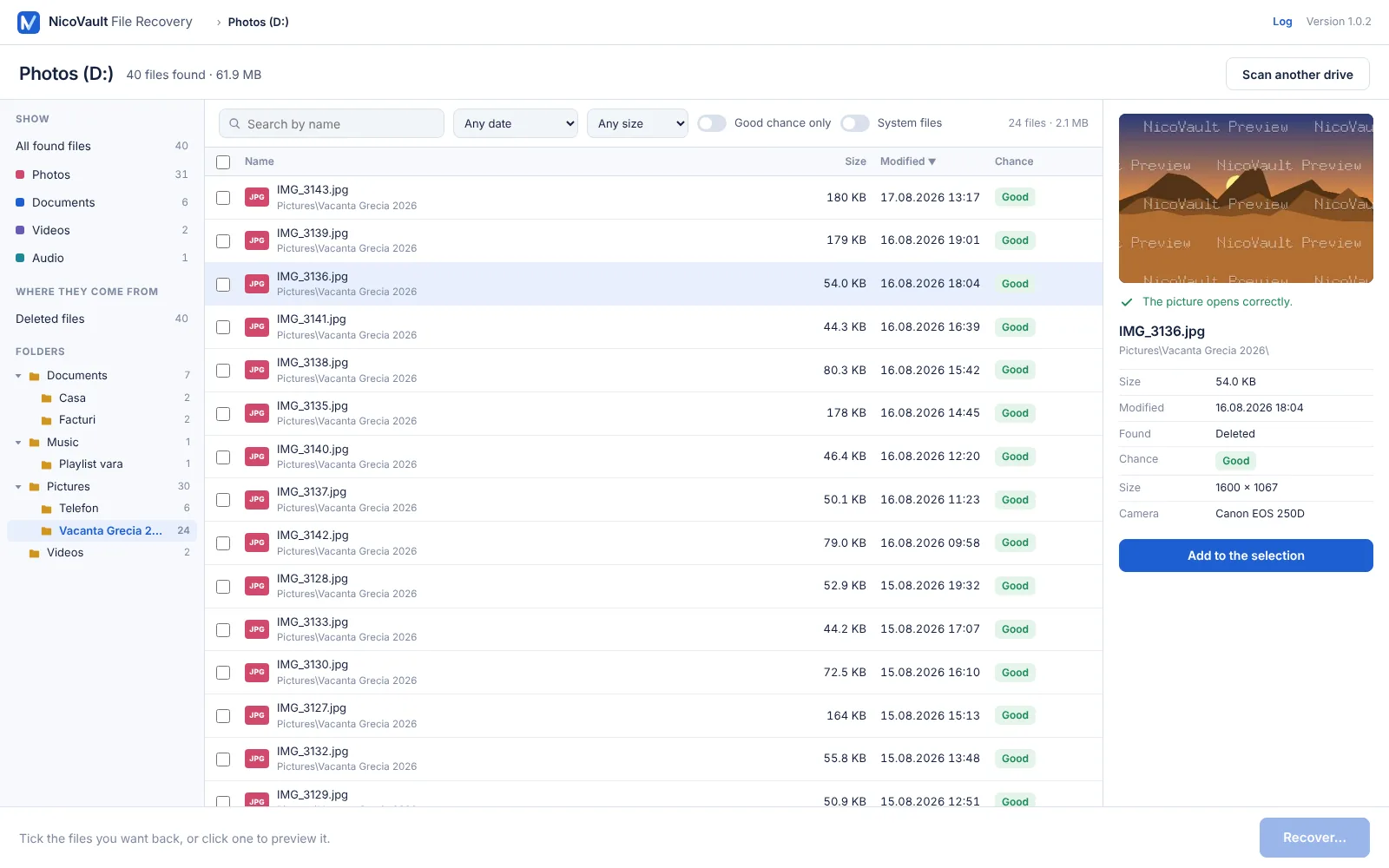
Quick scan: seconds. The file system still remembers deleted files, so they come back with their names and folders. The deep scan then searches the free space by content, for formatted cards and lost partitions.
Every file gets an honest chance – Good, Partly overwritten or Lost – from the drive's own records of which space has been reused.
Pick the drive, see what's there, choose what to save.
- Choose the drive the files were on
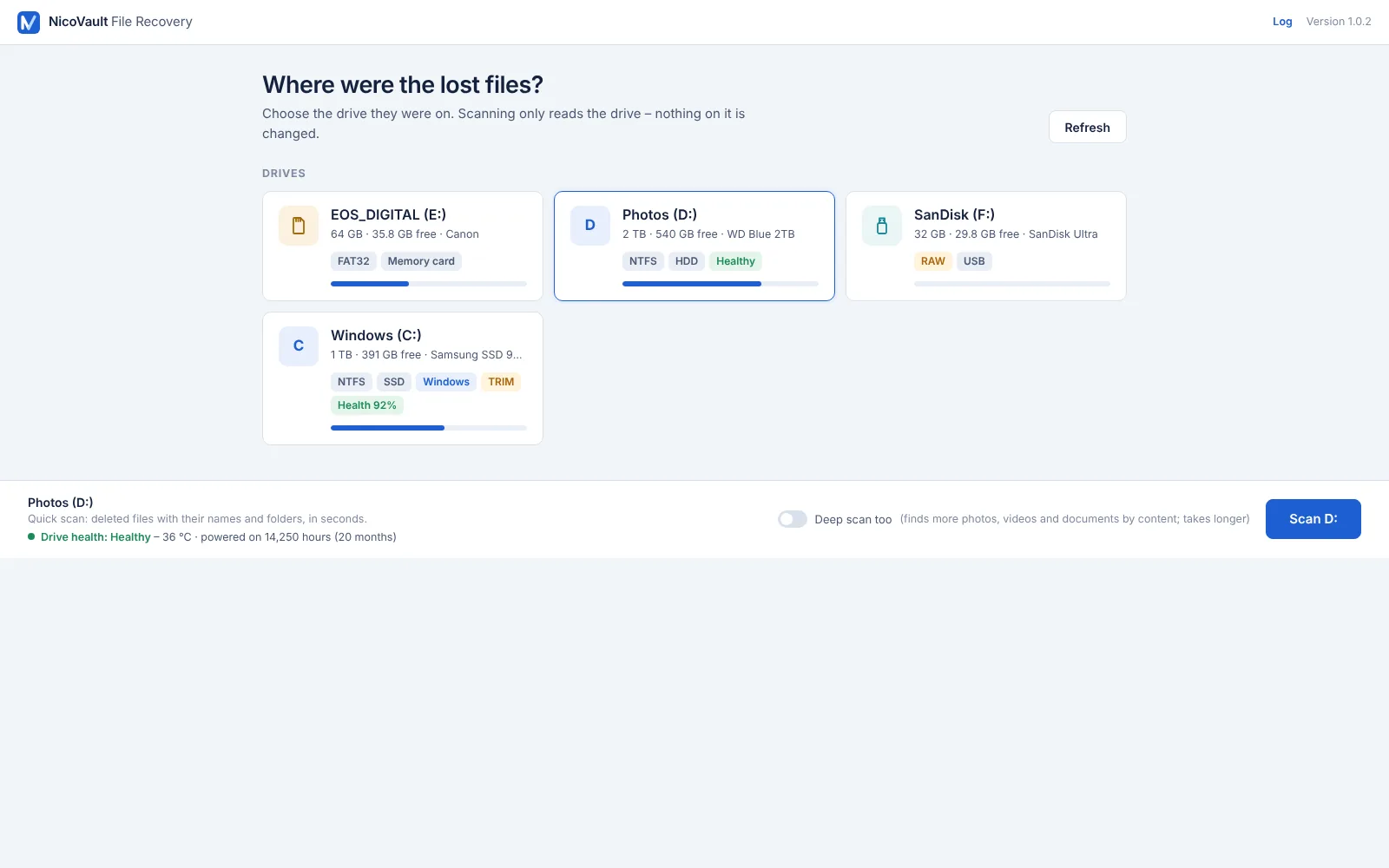
C:, D:, a USB stick, an SD card from a camera, an external disk. It is only read: nothing on it changes.
- Scan and look through the results
Deleted files appear with their names, folders and dates, grouped as photos, documents, videos, music and programs. Click any of them for a preview.
- Tick the ones you want and recover
They are saved to another drive – never onto the one you are scanning, so nothing else gets overwritten.
Built for the moment you realise the files are gone.
A deleted file is not erased right away – it waits in the free space until something is written over it. Everything in File Recovery is there to find it first, and to tell you the truth about its state.
Names and folders, not “file0001”
On NTFS, FAT32 and exFAT drives the deleted files come back as they were: Pictures\Vacation 2026\IMG_3136.jpg, with the date. Files emptied from the Recycle Bin too, at their original place.
Deep scan by content
For a formatted card, a stick Windows asks to format, or a lost partition: photos (JPEG, PNG, HEIC, RAW), videos, Office and PDF documents, music, archives and programs are found by what is inside them. Photos get the date they were taken as their name.
Free preview of every file
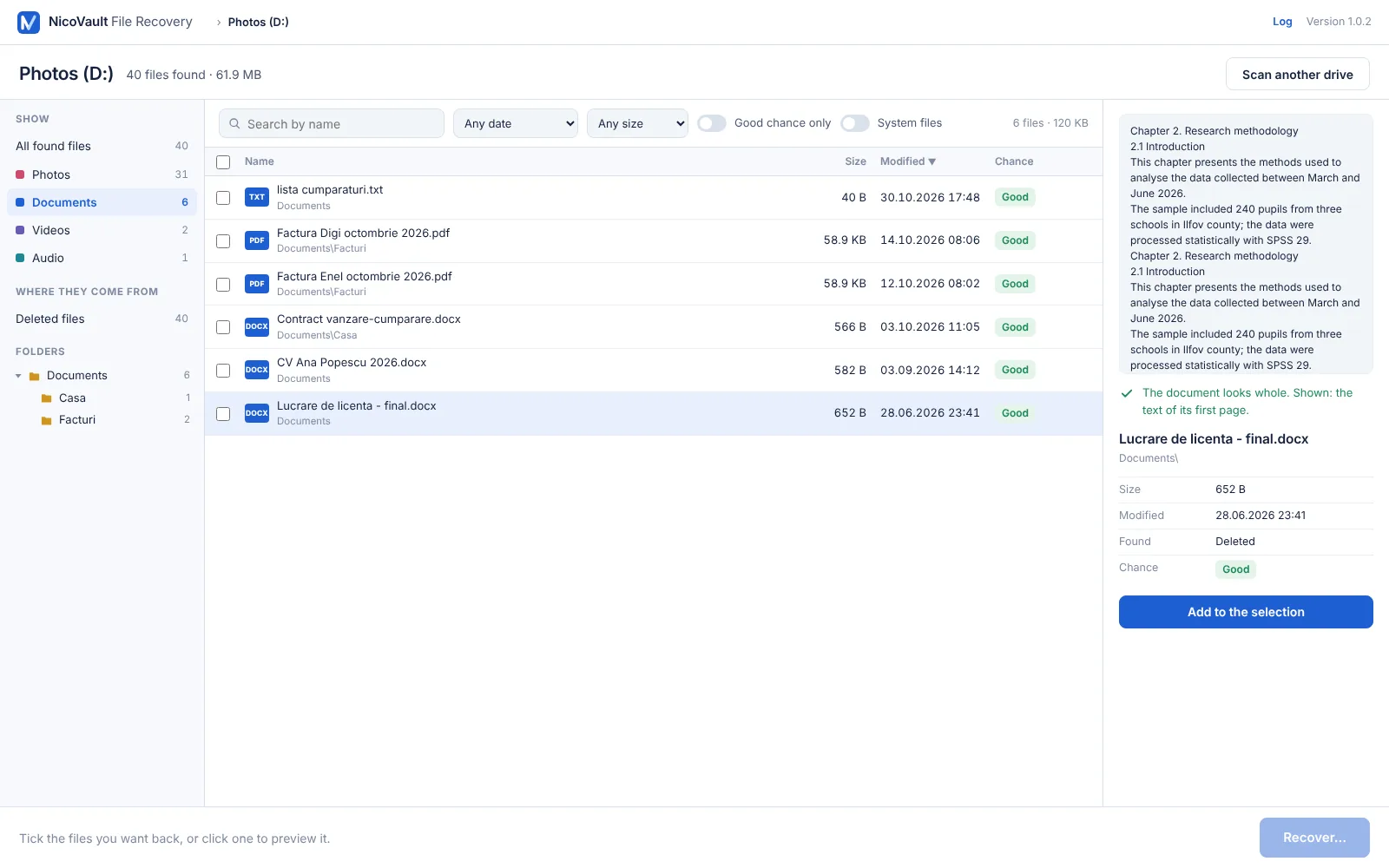
Photos as a small image, Word, Excel and PowerPoint as the text of their first page, PDFs and videos checked for completeness. A file that is already damaged is marked, so you know before you pay.
An honest chance for each file
Good, Partly overwritten or Lost – read from the drive's own map of free space, and on SSDs from the data itself. No “99 % recoverable” on a file that is already gone.
Restore points and lost partitions
A file erased from the SSD by Windows often survives in a restore point: File Recovery looks there too. A partition that was deleted or “needs to be initialized” is found again with all its files and folders.
Never writes to the scanned drive
Scanning only reads. Recovered files always go to another drive – the program refuses the scanned one, and even a folder that leads back to it. Drives that report they are failing are flagged, so you recover the important files first.
See exactly what you get.
The free version shows the whole result: every file, its chance, and a preview. Open a document and read its first page; open a photo and see it. If what you need is not there, you have spent nothing.
- Search by name, filter by type, date, size and chance
- The original folder tree, to find things where they were
- System and temporary files hidden, so your own files stand out
Saved somewhere safe, folders and all.
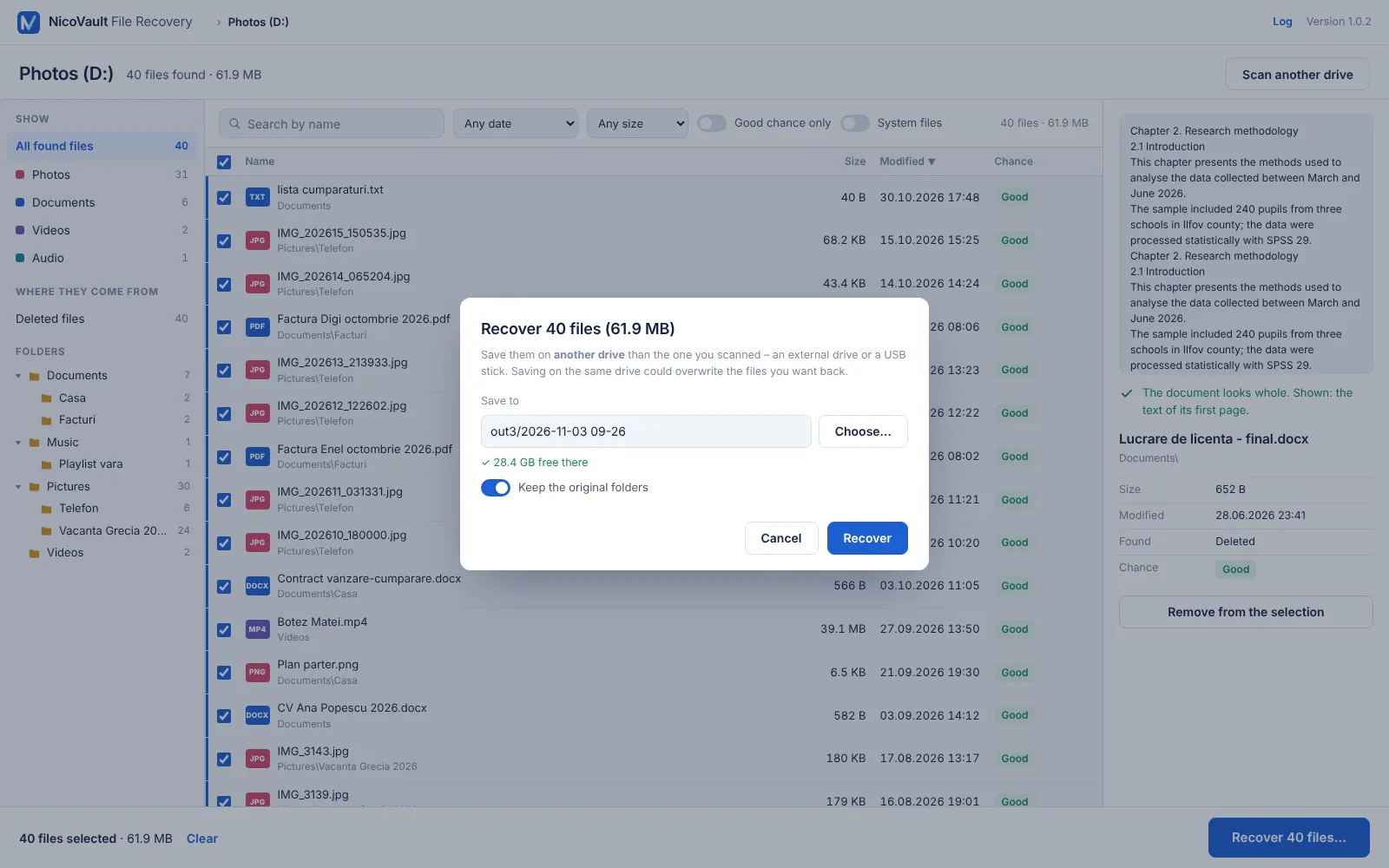
Choose a folder on another drive and the files are written there with their original folders and dates. A report says what came back whole and what did not.
- The scanned drive is refused as the destination, with the reason
- A warning if you selected files that are partly overwritten
- Unreadable sectors are skipped, not fatal: the rest of the file is saved
Where it works well – and where no program can help.
The chances depend on the drive, not on the program. Here is the honest picture, so you don't pay for a miracle.
Hard disks, USB sticks, memory cards, external drives
Deleted files stay in place until something is written over them – often for months. Stop using the drive, scan it, and most of them come back whole. Formatted cards too, by deep scan.
Files deleted long ago, drives in daily use
Every new file written since then may have taken the space of an old one. The chance tells you: Partly overwritten files open with damage, Lost ones don't. The preview shows the truth before you pay.
The SSD Windows runs from
Windows tells SSDs to erase deleted files within minutes (TRIM). No program can read erased flash – anyone promising that is selling you a scan. File Recovery marks those files Lost, and checks the Windows restore points, where a copy often survives.
Free to scan and preview. Pay once to recover.
Scan any drive and look at every file for free. A license unlocks the saving – for one recovery or for good. Prices in euro.
Free
To see what can come back.
- Quick scan and deep scan, any drive
- Every file with its name, folder and chance
- Preview of photos, documents, videos
- Saving the files needs a license
Single Recovery
For the files you lost today.
- 7 days from purchase, on 1 computer
- Recover as many files as you need in that time
- All drives: internal, USB, cards
- The key arrives by e-mail in minutes
Lifetime
For your computer, for good.
- 1 computer, for as long as you use it
- Unlimited recoveries
- All 1.x updates
- Moves with you to a new computer
Single Recovery: the key works for 7 days from the purchase – enough to scan again, recover more, and check the result. Lifetime: pay once and use it for good on one computer, with every 1.x update; to change computers, remove the license from the old one. The key is separate from NicoVault Backup and Disk Cloner licenses. If files shown as Good do not come back and we can't solve it together, you get your money back within 14 days (refund policy).
Frequently asked questions
I pressed Shift+Delete or emptied the Recycle Bin. Can the files come back?
Usually yes, on hard disks, USB sticks and memory cards: Windows only marks the space as free, and the file stays there until something else is written over it. Stop using the drive and scan it as soon as you can. Files emptied from the Recycle Bin come back with their original names and folders.
What should I do first, right now?
Stop saving anything to that drive – no downloads, no installs, no photos. If the files were on C:, install File Recovery on another drive or a USB stick if you can, and recover to a different drive. Every write to the drive can take the place of a deleted file.
Does it work on an SSD?
Partly. Windows tells SSDs to erase deleted files (TRIM), usually within minutes, and no program can bring those back – File Recovery checks the data itself and marks them Lost instead of selling you hope. It also looks in the Windows restore points, where a copy of the file often survives, and files deleted seconds ago are often still there. External SSDs in USB enclosures usually don't get TRIM, so they behave like hard disks.
What does the free version do?
Everything but the saving: it scans the drive, lists what it finds with names, folders, dates and the chance of recovery, and shows a preview of each file – photos as a small image, documents as the text of their first page. You see exactly what you get before you pay.
Can I recover files from a formatted drive or card?
Yes. After a quick format, the deep scan finds photos, videos, documents, music and programs by their content. Names and folders are usually gone after a format, so photos are named after the date they were taken and sorted by type. A full format on an SSD, or a card used again since, leaves much less.
Windows says the drive needs to be formatted, or a partition disappeared.
Don't format it. Open File Recovery, choose the drive under Whole disks and scan: a deleted or damaged partition is found again with its files and folders, and a card Windows can't read is searched by content.
What does “Partly overwritten” mean?
Part of the file's space has been reused by another file since it was deleted. The program tells you from the drive's own records – and the preview shows what is left. A photo may open with a grey bottom; a document may be missing pages. Such files are marked before you recover them.
Which file types can it find?
By name, on NTFS, FAT32 and exFAT: any file. By content, in the deep scan: JPEG, PNG, GIF, BMP, WebP, HEIC and camera RAW photos; MP4, MOV, MKV, WebM and AVI videos; Word, Excel, PowerPoint, PDF, OpenDocument and old Office files; MP3, M4A and WAV music; ZIP, 7z and other archives; Windows programs and installers.
Which license do I need?
Lost files once? Single Recovery: €7.99 for 7 days on the computer you are on, as many files as you need. Want it on hand for the next time too? Lifetime: €24.99 once, on one computer, with updates. Both keys start with FR-; NicoVault Backup and Disk Cloner keys don't work here.
Can I get my money back?
The free version shows every file with its chance and a preview, so you know what you are buying. If files shown as Good still don't come back and we can't solve it together, write to us within 14 days of purchase and you get the money back. See the refund policy.
Windows says “Windows protected your PC”. Is it safe?
Yes. The installer is digitally signed with a Certum code-signing certificate (publisher: Geanina-Elena Sava-Mimbler). Because the program is new, SmartScreen may still warn about it for a while: click More info → Run anyway.
Free to download, scanning in a minute.
An ordinary Windows setup. Scanning and previewing are free; enter a license key when you are ready to save the files. If the lost files are on C:, install it on another drive if you can.
Signed installer. Setup installs File Recovery to Program Files, adds Start menu and desktop shortcuts and, only if it is missing, the free Microsoft Edge WebView2 Runtime from Microsoft, which draws the window. Nothing else: no other software, no ads, no startup entries. Scanning only reads your drives. Uninstall anytime: Windows Settings → Apps → Installed apps → NicoVault File Recovery · Terms · Privacy
| System | Windows 10 / 11 (64-bit) |
| Drives | Internal and external disks, SSDs, USB sticks, memory cards; NTFS, FAT32, exFAT |
| Size | ≈ 6 MB |
| Version | 1.0.3 · 03.11.2026 |
| SHA-256 |
The installer is digitally signed (Certum certificate, publisher: Geanina-Elena Sava-Mimbler). Windows may still show “Windows protected your PC” for a while: click More info → Run anyway. Installation guide