Automatic backup. Restore in one click.
NicoVault backs up files, folders or the entire computer to a disk, NAS, server or the cloud. It runs as a Windows service, even when nobody is signed in, and any file can be found and restored from an explorer with a timeline.
✓ Signed installer✓ No ads or toolbars✓ Uninstall anytimeWhat setup installs ↓
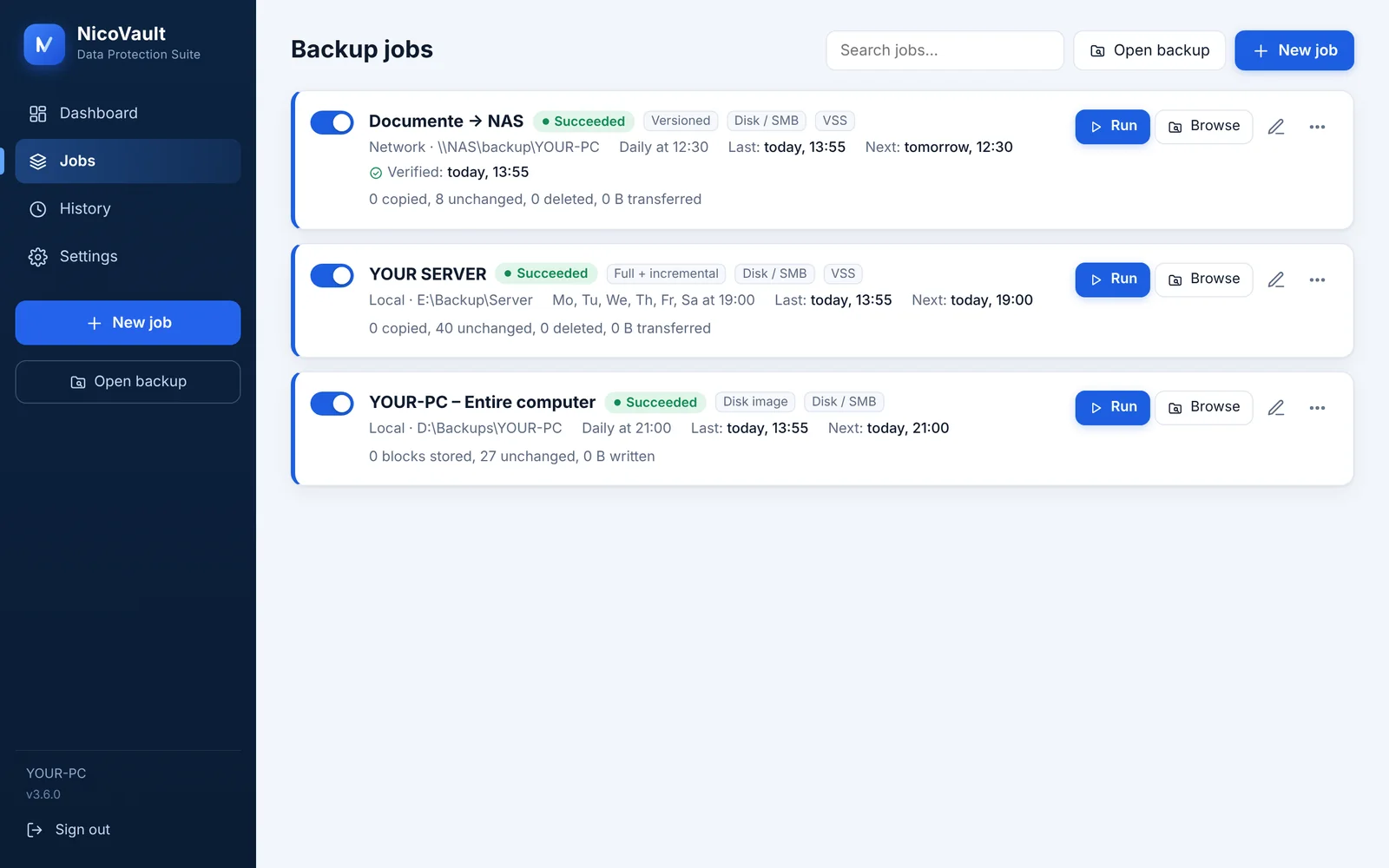
Full on Saturday, incremental on the other days, kept for 14 days. A chain is only deleted as a whole.
To what you already have: disk, NAS, server or cloud.
You don't need a separate storage plan. Pick a destination for each job; passwords stay encrypted on your computer.
Everything a serious backup needs, without cloud subscriptions.
Runs as a service
Backups start on time even when nobody is signed in. If the PC was off, the missed run catches up.
Volume Shadow Copy
Copies open files too: databases, Outlook, running Hyper-V virtual machines.
Four backup modes
Mirror, copy without deleting, versions with retention (hourly, daily, monthly) and Full + incremental with .nvf / .nvi archives.
Image of the whole PC
Only used blocks, incrementals store only what changed. Full restore from a USB stick, VHDX export for Hyper-V.
AES-256 encryption
Optional, per job. Contents and file names are encrypted before they leave the computer.
Scheduled verification
Quick (presence and size) or full (contents). You learn a backup is damaged before you need it.
Explorer with a timeline
Pick the day, search for a file and restore it to its original place or another folder, with the full path.
Open the backup on another PC
Laptop died? Install NicoVault on another one, click “Open backup”, enter the password and take your files.
E-mail notifications
You get a message when a backup fails or has warnings. When everything works, it stays quiet.
Find last Tuesday's file in ten seconds.
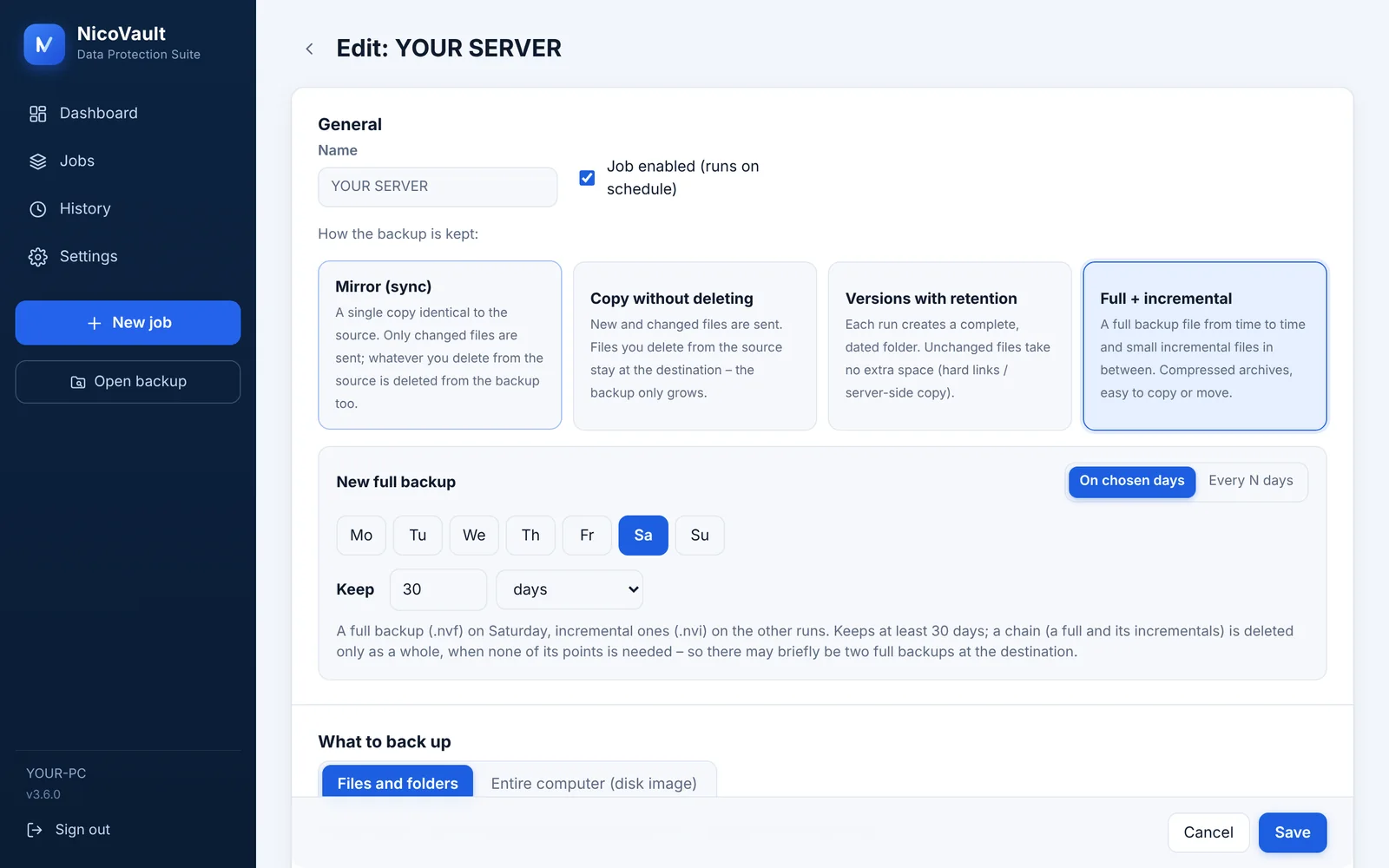
The explorer shows the backup like a disk: folders on the left, files on the right and the timeline with every version below.
- Search by name or pattern (*.pdf, invoice*2026*)
- Download, restore to the original place or another folder, with the full path
- Also from a disk image: browse C:\Users without mounting anything
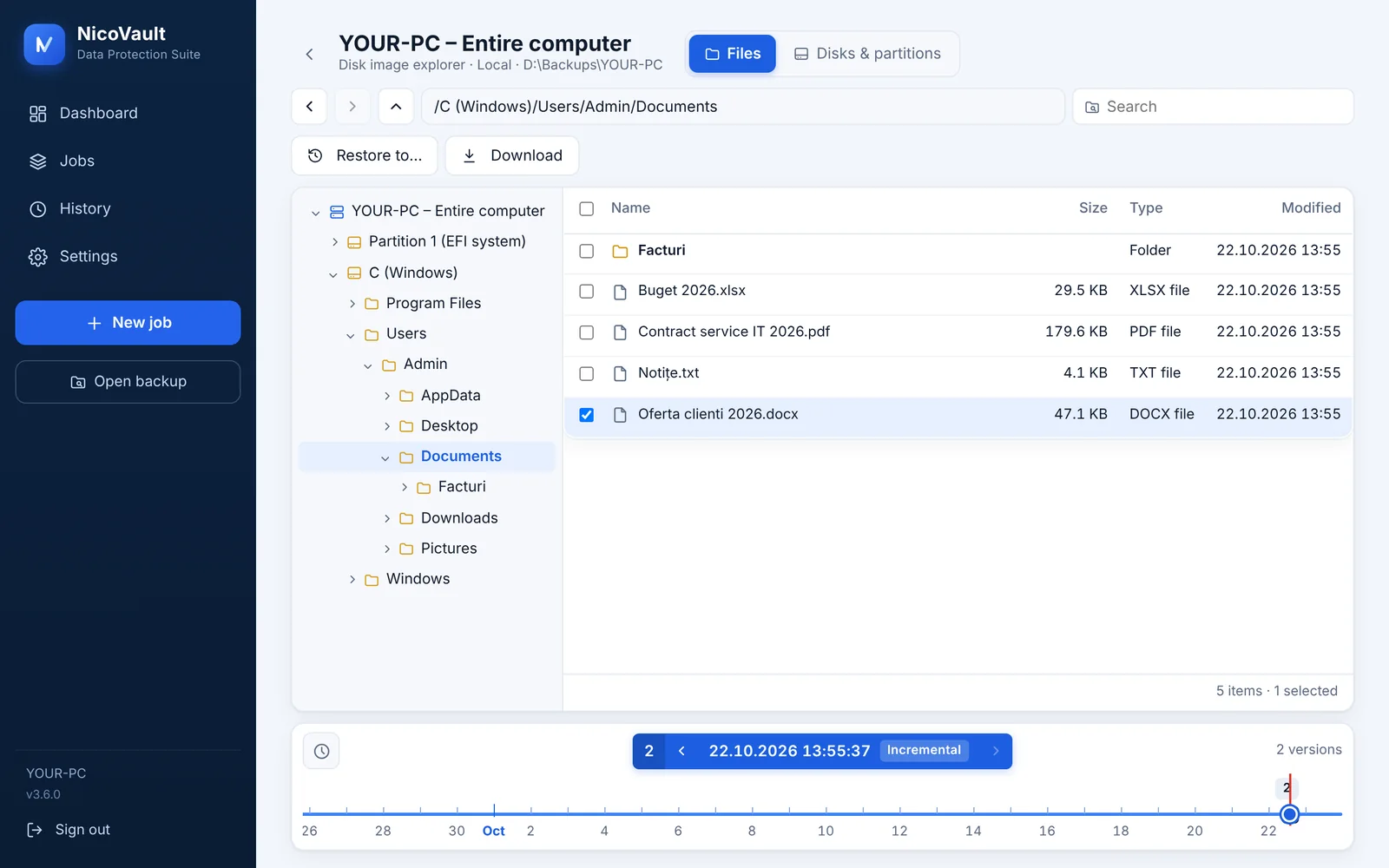
Full on the day you choose, incremental the rest.
Pick the days for the full backup (or every N days) and how long to keep, in days or restore points. Old chains delete themselves, whole.
- Daily, weekday, monthly or interval schedules
- Run now, or “Run a full backup now”
- The computer doesn't go to sleep while a backup runs
See at a glance what was backed up and what wasn't.
Every job shows its last run, the result and the next scheduled run. While it runs you see the transfer speed and the time left.
- E-mail on failure or after every run
- Scheduled verification: the backup is read back and compared
- Full history, with a log for every run
Try file backup free for 7 days.
The trial includes file backup (mirror, copy, versions). A license unlocks everything: full + incremental, disk images with the recovery USB and, with Server, Hyper-V virtual machine backup. Prices in euro.
Personal
For a home computer or a laptop.
- 1 PC with Windows 10 / 11
- Every destination and mode
- Disk image and recovery stick
Pro
For a family or a small office, up to 5 computers.
- 5 PCs with Windows 10 / 11
- Every destination and mode
- Disk image and recovery stick
Server
For the company server and its virtual machines.
- 1 Windows Server 2016–2025
- VM-level Hyper-V backup, with the VMs running
- Priority e-mail support
Yearly and monthly: if you don't renew, new backups stop; the ones already made stay and can be restored at any time. Lifetime: pay once, with all updates for versions 3.x and 4.x. A Pro license can be moved to another computer at any time. Buy on the Buy page; the license key arrives by e-mail. 14-Day Money-Back Guarantee.
NicoVault is an independent software project focused on making backup and recovery reliable and accessible for individuals, small businesses and IT professionals.
Built on hands-on experience with Windows systems, servers, NAS environments and data protection, NicoVault is designed around one simple idea:
Backup should be easy to set up, easy to verify and easy to restore.
- 3.9 · octombrie 2026
The trial covers file backup; full + incremental, disk images and Hyper-V need a license. The license is tied to the computer through the motherboard too. Full restore verified on another SSD; the VHDX export tells you which Hyper-V VM generation to pick.
- 3.8 · octombrie 2026
Licenses and a 7-day trial. Hyper-V jobs need the Server license.
- 3.7 · octombrie 2026
VM-level Hyper-V backup: restore in place or as a new VM, plus single files from inside the virtual disks.
- 3.6 · octombrie 2026
Files inside a disk image show directly in the explorer, without mounting. Live transfer speed. On Windows Server 2016/2019 the setup installs WebView2 by itself.
- 3.5
Disk image of the whole computer and a recovery USB. Full + incremental backup chains.
Frequently asked questions
Does it work on Windows Server 2019?
Yes, on Windows Server 2016, 2019, 2022 and 2025. On 2016 and 2019 the setup installs the Microsoft Edge WebView2 component the program window needs.
Can I back up running Hyper-V virtual machines?
Yes, with the Server license. Tick the virtual machines and NicoVault backs them up running, through VSS with the Hyper-V writer, with settings, disks and checkpoints. Incrementals store only changed blocks. Restore the whole machine (in place or as a new VM) or just files from inside it.
What if my laptop breaks?
Install NicoVault on another computer, choose “Open backup”, point it to the backup folder and enter the password if it is encrypted. For the whole computer, use the recovery stick made from Settings.
Is the backup in a closed format?
No. In Mirror, Copy and Versions modes the files sit at the destination as ordinary files. Full + incremental archives (.nvf / .nvi) open in NicoVault on any computer with “Open backup”, no license needed.
Do I also pay for cloud storage?
No. Use what you already have: a disk, a NAS, a server or your own OneDrive, Google Drive or S3 account.
What does Lifetime mean?
You pay once and use the program forever, with every 3.x and 4.x update. Version 5 and later come as a discounted upgrade.
What happens after the 7-day trial?
Backups stop until you enter a license key (Settings → License). Everything already saved stays: you can browse and restore your files at any time, even without a license.
Windows says “Windows protected your PC”. Is it safe?
Yes. The installer is digitally signed with a Certum code-signing certificate (publisher: Geanina-Elena Sava-Mimbler). Because NicoVault is new, SmartScreen may still warn about it for a while, as it does for any program it hasn't seen on many computers yet. Click More info → Run anyway. Step-by-step installation guide
Install in two minutes, first backup in five.
An ordinary Windows setup: Next, Install, Finish. rsync and rclone are included, nothing else to download.
Signed installer. Setup installs NicoVault to Program Files together with the rsync and rclone tools it uses, and a Windows service that runs your scheduled backups. On Windows Server 2016/2019 it also installs the free Microsoft Edge WebView2 Runtime from Microsoft, which draws the window. No other software, no ads. Uninstall anytime: Windows Settings → Apps → Installed apps → NicoVault · Terms · Privacy
| System | Windows 10 / 11 (64-bit), Windows Server 2016–2025 |
| Size | ≈ 30 MB |
| Disk image | Full recovery: UEFI computers |
| Interface | Its own window (WebView2); also in a browser, locally |
| Version | 3.9.9 · 02.11.2026 |
| SHA-256 | 469e6d89e0f1f642474f741851fcab89a31292b04e5a1390d1b9b140ac0e9ee7 |
The installer is digitally signed (Certum certificate, publisher: Geanina-Elena Sava-Mimbler). Because NicoVault is new, Windows may still show “Windows protected your PC” for a while: click More info → Run anyway. You can also check the file against the SHA-256 above (PowerShell: Get-FileHash). Installation guide
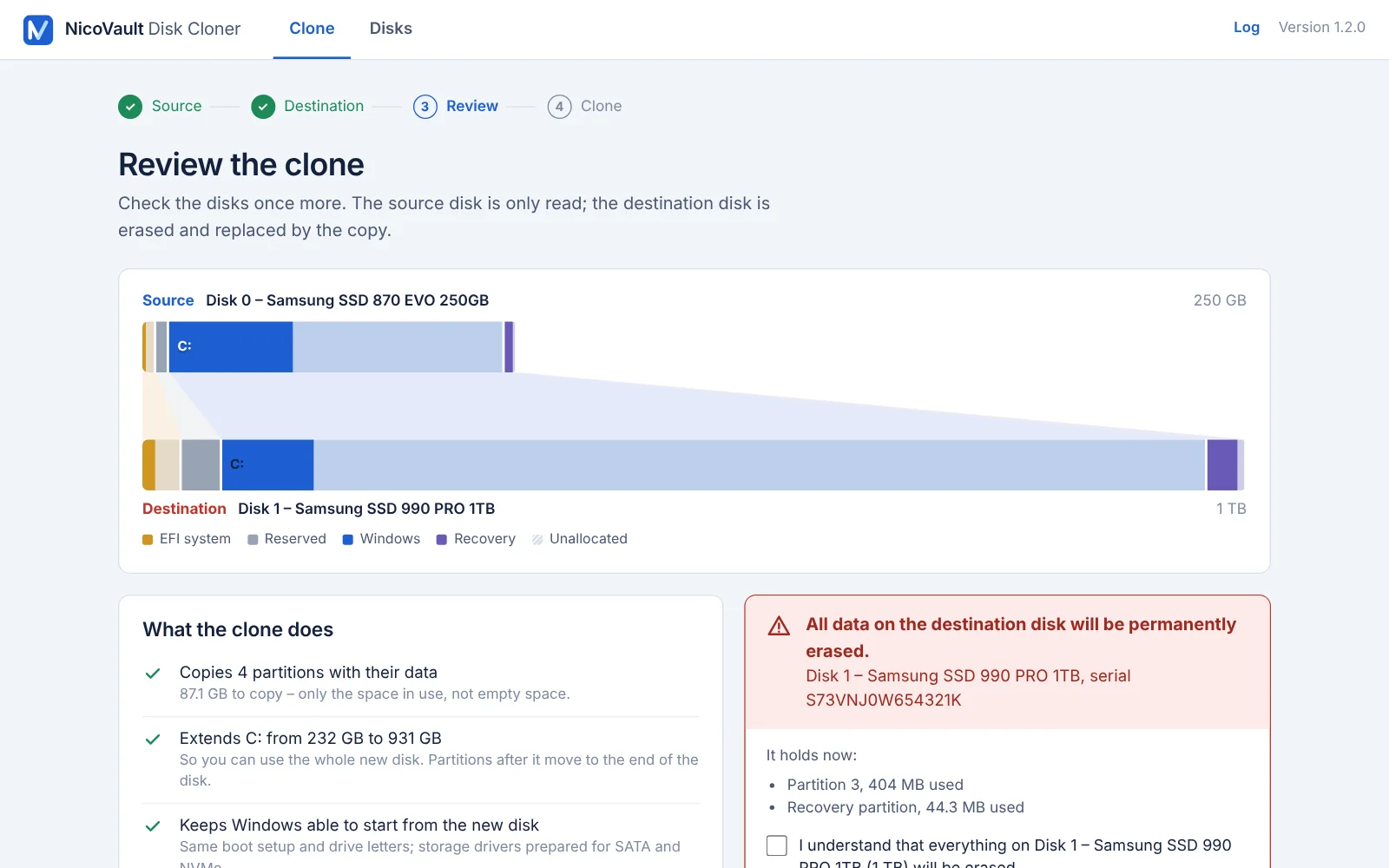
Disk Cloner: move Windows to a new SSD.
A separate program for the day you replace a disk. It copies Windows, programs and files to a new SSD, NVMe or hard disk, verifies every block, and the new disk starts just like the old one – no reinstalling.
- The whole disk, or only Windows
- C: grows to fill the larger disk
- Its own license: €25, pay once
File Recovery: deleted the wrong files? Get them back.
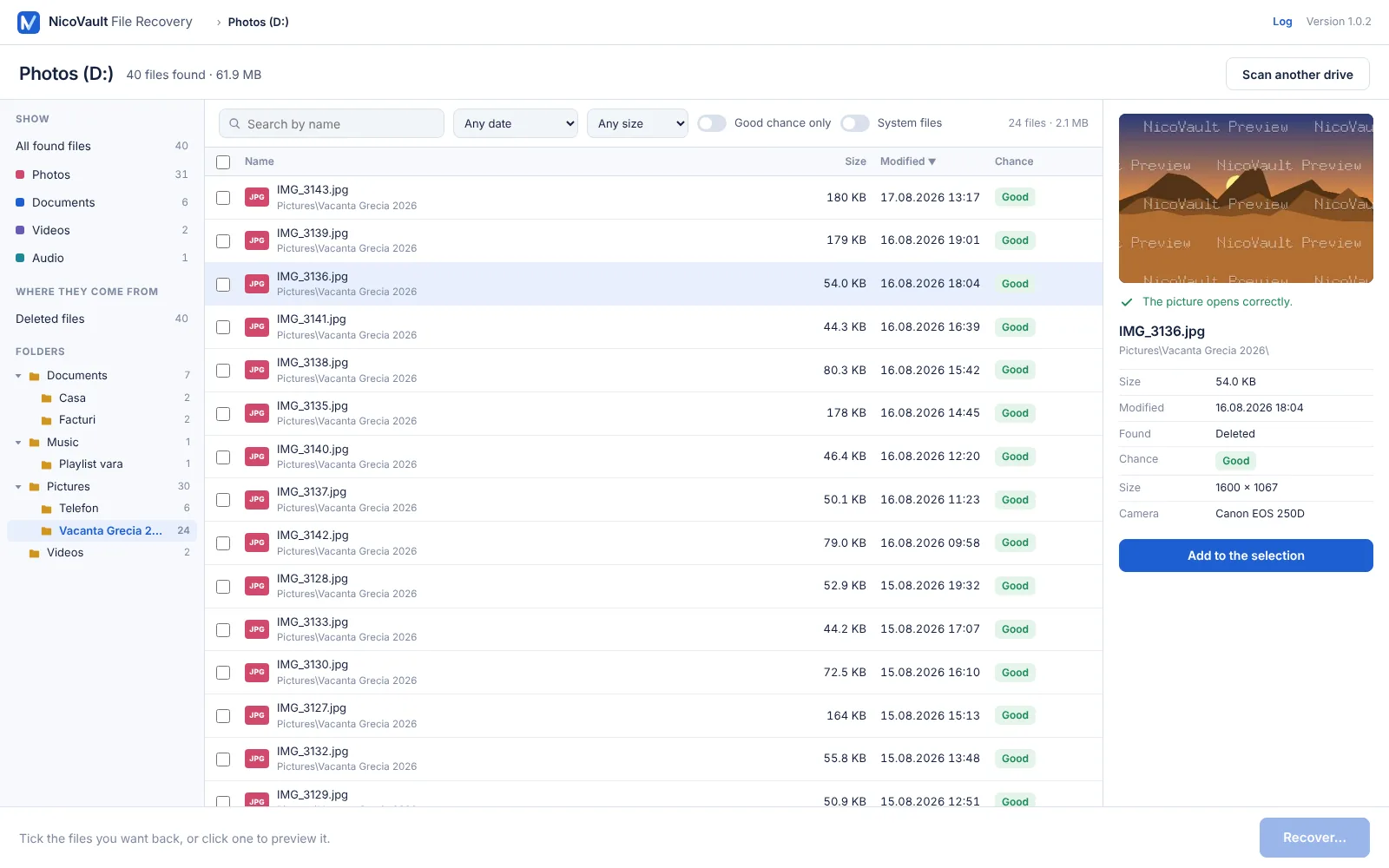
A separate program for the day a file disappears. It scans the drive – your PC, a USB stick, an SD card or an external disk – and shows the deleted files with their names, folders and a preview. Scanning and previewing are free; pay only when you see what comes back.
- Names and folders, not “file0001”
- Formatted cards and lost partitions, by deep scan
- Its own license: from €7.99 for one recovery
PC Migrator: new PC? Bring your files, apps and settings.
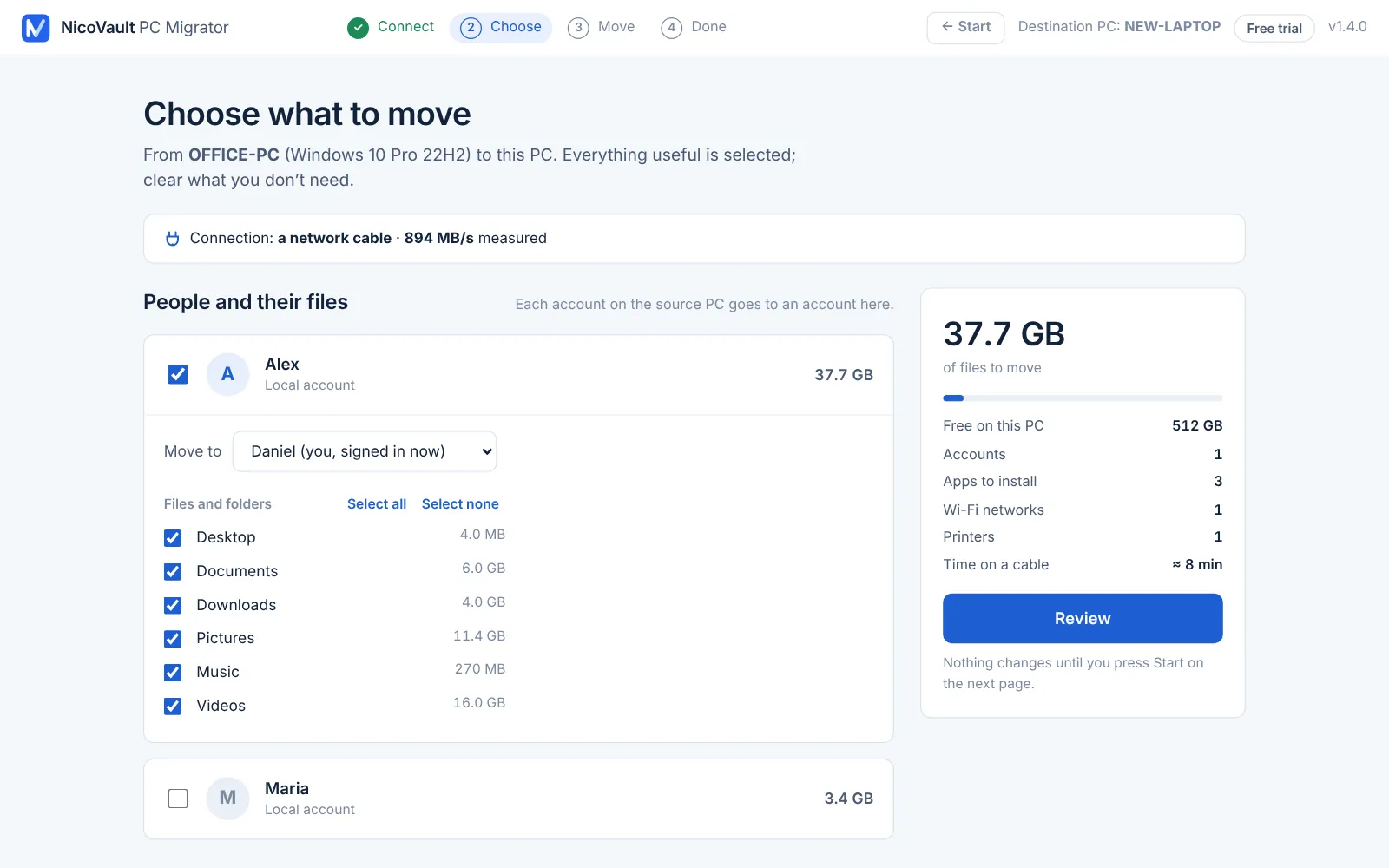
A separate program for the day you change computers. Open it on the old PC and on the new one, connect them over your network – or attach the old PC’s disk – tick what you want, and it moves your files, browser bookmarks, Wi-Fi, printers, settings and apps. The old PC is only read.
- Files, apps and settings in one pass
- Free trial: a real move of 1 GB of files and 3 apps
- Its own license: €39.99, pay once
Contact & support
Company licenses, technical questions or a problem with a backup: write to contact@nicovault.com. Support inquiries are typically answered within one business day.